Same screen.
Different saved data.
Investigating which saved fields changed after an app edit? Put selected storage values, field changes and screenshots beside your Playwright actions in one local HTML report.
localStorage · sessionStorage · IndexedDB
No account or API key. Keep your waits, assertions and Trace.
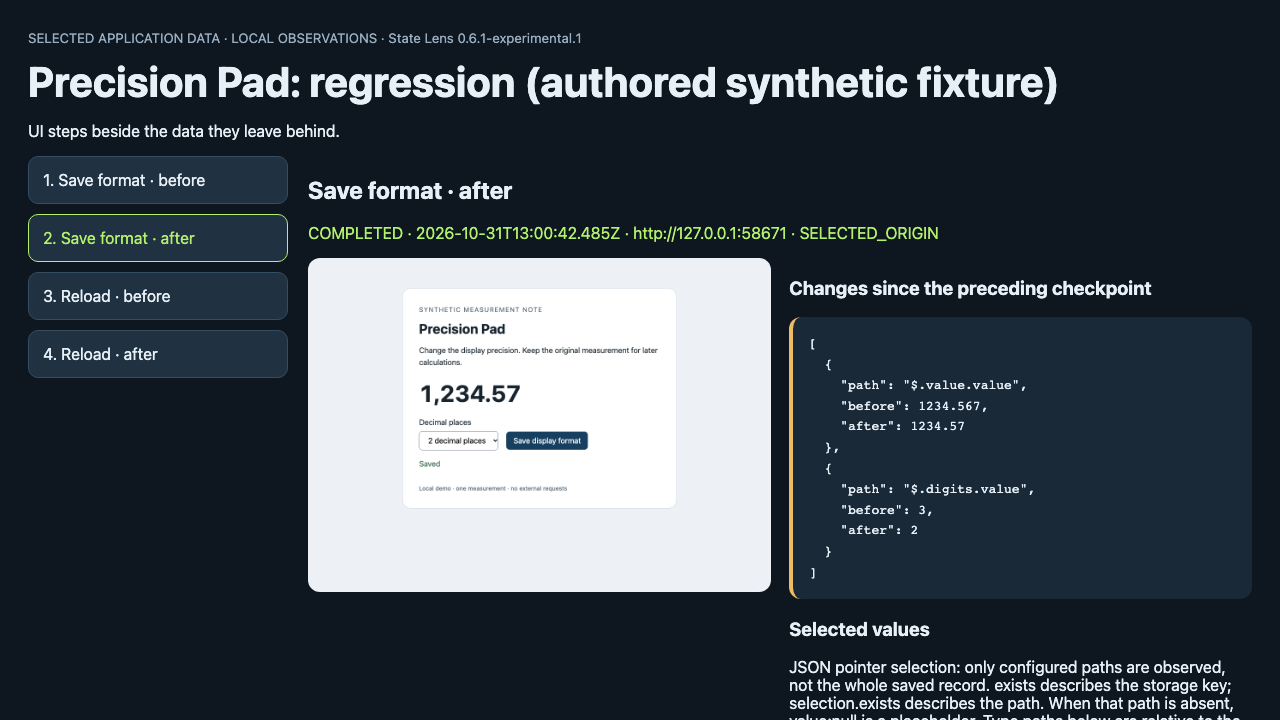
Choose your existing workflow.
Select the storage key or JSON pointer you need to compare across an action and reload. The helper records observations; your native assertions decide correctness. Reports stay local and contain the selected data and screenshots.
JavaScript / TypeScript
Node20.19+ and an existing Playwright Chromium installation. Copy one versioned module beside your test or plain script.
Copy the integration ↗Python Playwright
Python3.11+ and an existing synchronous HTTP(S) Page. Add one Python file to the same test; keep the native waits and assertions.
Use the Python preview ↗Drive the app yourself
Node20.19+ and installed Playwright Chromium are required. Perform the actions manually and name each checkpoint in the terminal.
Record without writing a test ↗Own-app reports: transaction edit, reload and delete with0.2 · Sethera display formatting and selected fields with0.4.1/0.5. These are the developers' public reports; diagnosis time savings have not been measured.
Useful in your workflow? Star the repository or share a result or blocker.
Earlier tools and recorded experiments
DBは守れた。
添付ファイルは?
Supabaseの行と非公開ファイルを、2ユーザーと匿名で検査。持ち主の読み取りを保ったまま、設定変更前後を比較します。
Node22+ · 依存なし · モデル呼び出しなし · service-roleキー不要
DB: 6 / 6 PASS
Private files: 6 exposures
公開バケットへの変更だけで、DBが合格のままファイルが別ユーザー・匿名から取得可能に。修復後は同じ契約の14検査がPASS。全員拒否は判定不能になります。
12通りの実測を切り替える ↗1つのローカルSupabase環境での当方の合成データ検証。第三者利用やアプリ全体の安全性を示すものではありません。
You wrote the instructions.
Check what Codex loads.
Inspect startup file selection and its byte budget. Then, when you need receipt evidence, test a fresh session before and after a settings or CLI change.
Node 22+ · Stable Codex 0.163.0 / 0.164.0 for inspection · Zero model turns for inspection
Each file fits. The shared budget does not.
| Instruction file | File size | Local byte estimate |
|---|---|---|
| Root | 24,000 B | FULL |
| Child | 18,000 B | 8,768 B · TRUNCATED |
A listed file can still be partial. File paths are native observations; the byte values are separate local estimates. This fixture used zero model turns. Receipt and compliance were not tested.
Read the measured controls and reproduce them ↗Inspect in one command.
From your project's startup directory, use Node22+, npm/npx and your installed Codex CLI. This downloads and runs the unchanged common v0.1.4 package from this repository's Pages site.
npx --yes --ignore-scripts --allow-remote=root \
  --package="https://aichance.github.io/business-ai-recipes/agent-relay-check-v0.1.4-npx1.tgz" \
  agent-relay-check inspect --project "$PWD"
No npm dependencies or install hooks. npm keeps the package in its cache; this does not install Codex or add a project dependency. Review, checksum, PowerShell and troubleshooting ↗. Prefer an archive? Extract the preserved small ZIP, open agent-relay-check, then run node cli.mjs inspect --project "/absolute/path/to/your project".
Read the startup report
estimate.native_project_sources lists selected project files. estimate.rows contains the separate local byte estimates. Unknown versions or settings stay INCONCLUSIVE.
Inspection requests zero model turns and leaves instruction files unchanged. Normal Codex initialization can communicate and write local metadata.
Inspection guide and supported scope ↗Test receipt after a change
The separate marker check makes one authenticated model call in a fresh session. It checks whether that response returns a disposable marker from your instructions; observed tool activity makes the result inconclusive.
Use your existing access and quota. The default is gpt-6.1-sol/MAX; v0.1.4 also accepts an explicit model and effort that already work for you, without automatic fallback. Other combinations remain experimental. A marker receipt does not establish whole-file compliance.
Prepare a marker and compare two runs ↗No local CLI? The GitHub Actions recipe checks native selection plus separate local FULL estimates in your checkout. It uses the pinned v0.1.4 kit and official Codex 0.164.0, with zero model turns; receipt and compliance remain NOT_TESTED. Ordinary Actions usage limits apply.
Your app says “Saved.”
Does the data survive?
Check the next reload and the next rejected update. See which saved value changed, then rerun the generated Playwright test after a fix.
Node 22+ and Chromium required · No LLM or API key during a test run · MIT
Start with a disposable local app. You describe its save steps, expected saved values and a rejected input; the tool checks those conditions.
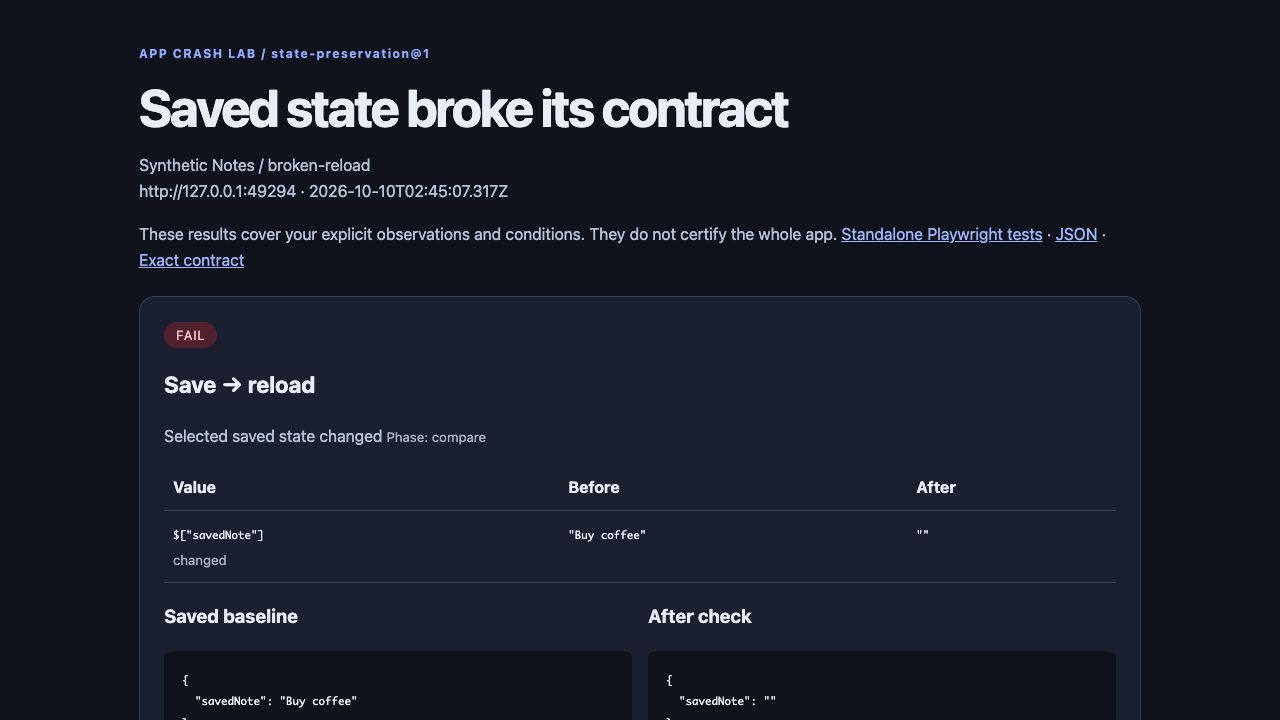
Save succeeds. Reload loses the note. This is a deliberately broken demo, not a production bug discovery. The same checks pass on its fixed version.
Show what your app does.
Explain what matters.
Add timed explanations to a screen recording. Start with this real app walkthrough: change its four captions, preview the result, and export a video or GIF in your browser.
The button loads the raw recording and its four editable captions together. Your own videos stay in your browser.
No signup, install or video upload · Tested in Chromium; export formats vary by browser.
Search → filter → inspect. SilentStars by capuz, recorded from an unchanged local build on 9 Oct 2026. Capture: shot-scraper. Captions and export: Demo Forge Browser Studio. Download the video, GIF and replay recipe ↗
Start with a real recording
Open the demo above, or choose your own MP4 or WebM. No project setup or account is needed.
Make each step understandable
Write short explanations and adjust their timing. Preview them alongside the original footage.
Take the result with you
Export a video or README GIF. Save the story JSON to reuse your explanation text and timing.
Use it inside your own app project.
The ZIP includes the recorder, sample app and skill instructions. You do not need a second repository checkout. Codex inspects your local app to prepare its selectors and expected result.
Install once, then ask for a demo
- Download the v0.3.0 skill ZIP and review the included files.
- Extract the whole
demo-forgefolder into your app's.agents/skills/directory. Keepscripts/andreferences/together withSKILL.md. Preserve any existing skill with the same name. - Open that app project in Codex and start your local app. Recording needs Python 3.11+, Playwright/Chromium, FFmpeg and ffprobe; the ZIP does not install them. Setup and dependency checks ↗
- Explicitly ask Codex to use
demo-forge. Replace the sample URL and reading-note task below with your app's real workflow.
Release, checksum and verification notes ↗ · Read the skill source ↗
A concrete request to adapt
Use the demo-forge skill.
My app is running at http://127.0.0.1:3000/.
Record adding a reading note: title Dune, note Remember desert ecology.
Show the saved title and note at the end, with short explanation cards.
Return the MP4, GIF and operation JSON so I can rerun it after UI changes.
Review the new run report and final frame before sharing. Chapter text is an authored explanation, not generated speech. The recorder uses a fresh Chromium session on one local HTTP port; external APIs and logged-in browser sessions are outside its scope.
Prefer direct commands? Use the CLI example below. Already have footage? Open Browser Studio to annotate it; that editor does not run the recorder's UI checks.
Put your explanation beside the evidence.
After recording the included app below, write a few short captions and their times. Demo Forge places them above the original footage without cropping or changing its speed. It runs locally with no API key.
python3 experiments/demo-forge/present.py \
  --run-dir .demo-forge-output/brief-url \
  --story experiments/demo-forge/story.example.json \
  --output .demo-forge-output/explained
Also requires ffprobe. Caption times are manual: review them against each new recording. Captions are your explanation, not additional facts checked by the app. Caption format and local instructions ↗
A failed run should not look successful.
An older version left the last successful MP4 beside a failed report when reusing an output directory. The v0.1.1 preview moves prior output into history before a new run and publishes fresh media only after checks and conversion finish.
The expected text is present
output/
├── run.json        status: success
├── demo-forge.mp4
├── demo-forge.gif
├── demo-forge.webm
└── cover.png
The next expectation is wrong
output/
├── run.json        status: failed
└── previous-runs/
    └── run-.../
        ├── run.json
        └── previous media
Verified locally: success → failure → success; injected GIF-conversion failure; previous media preserved. Inspect the fix · Recording and verification files
Start with the included release-brief app.
Use Python 3.11+, Playwright with Chromium, and FFmpeg on your PATH. No API key or logged-in browser profile is needed. Run the commands from the repository root.
git clone https://github.com/aichance/business-ai-recipes.git
cd business-ai-recipes
python3 experiments/demo-forge/forge.py --doctor
Need the Python browser dependency?
Create a project environment, install Playwright, then install its Chromium browser. Install FFmpeg separately with your usual package manager if the doctor reports it missing.
python3 -m venv .demo-forge-venv
.demo-forge-venv/bin/python -m pip install playwright
.demo-forge-venv/bin/python -m playwright install chromium
Then use .demo-forge-venv/bin/python in place of python3 for the runner below.
Terminal 1 — start the sample app
python3 experiments/demo-forge/examples/brief-app/server.py \
  --port 3000
Keep it running while recording. Press Ctrl-C when finished.
Terminal 2 — record and check it
python3 experiments/demo-forge/forge.py \
  --url http://127.0.0.1:3000/ \
  --operation experiments/demo-forge/examples/brief-app/operation.json \
  --output .demo-forge-output/brief-url \
  --tail-seconds 8
Open .demo-forge-output/brief-url/run.json and confirm status: success, then view the MP4 or GIF in the same folder. Adapting this to your app requires your actual selectors and expected outcome.
Where the local recorder fits
- Repeatable README demos for a local web app.
- Recording a known interaction after a UI change.
- Keeping a result report alongside media you share.
Recorder limits
- Localhost only. Assets must use the same port.
- Redirects, WebSockets and service workers are unsupported.
- UI text checks do not prove backend persistence.
- Use separate output directories for concurrent runs.